
 Kia Sportage: Console: Repair procedures
Kia Sportage Service & Repair Manual (3rd Generation, SL; 2011-2016) / Body (Interior and Exterior) / Interior / Console: Repair procedures
| Replacement |
Floor Console Replacement
| [M/T] |
|

| 1. |
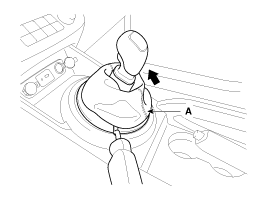
Using a screwdriver or remover, remove the gear boots (A).
|
| 2. |
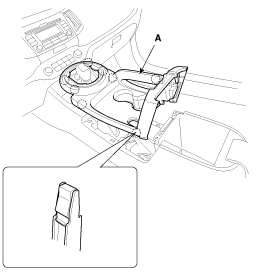
Using a screwdriver or remover, remove the console upper cover (A).
|
| 3. |
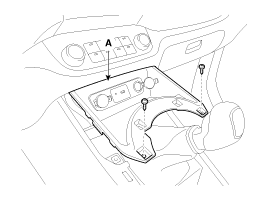
After loosening the mounting screws, then remove the floor console tray (A).
|
| 4. |
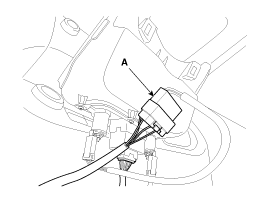
Disconnect the connector (A).
|
| 5. |
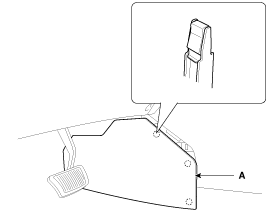
Remove the console side cover (A).
|
| 6. |
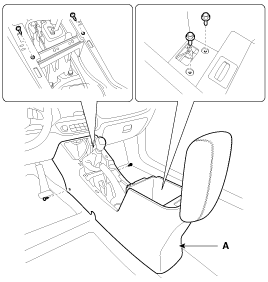
After loosening the mounting screws and bolts, then remove the floor console assembly (A).
|
| 7. |
Installation is the reverse of removal.
|

| [A/T] |
|
| 1. |
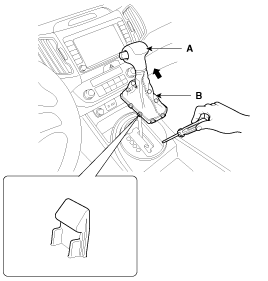
Using a screwdriver or remover, remove the gear boots (B) and gear knob (A).
|
| 2. |
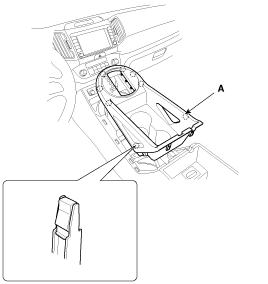
Using a screwdriver or remover, remove the console upper cover (A).
|
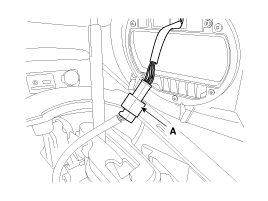
| 3. |
Disconnect the connector (A).
|
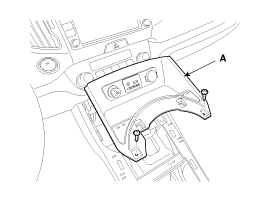
| 4. |
After loosening the mounting screws, then remove the floor console tray (A).
|
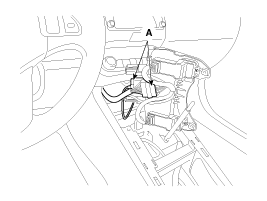
| 5. |
Disconnect the connector (A).
|
| 6. |
Remove the console side cover (A).
|
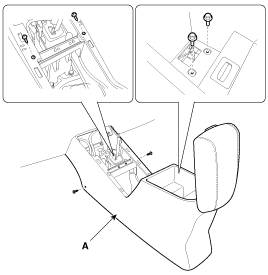
| 7. |
After loosening the mounting screws and bolts, then remove the floor console assembly (A).
|
| 8. |
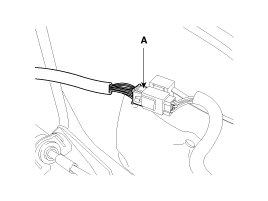
Disconnect the floor console main connector (A).
|
| 9. |
Installation is the reverse of removal.
|
Armrest Replacement
|
| 1. |
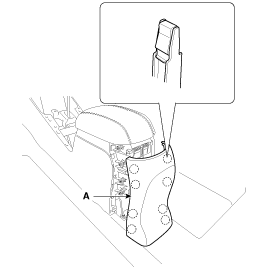
Using a screwdriver or remover, remove the rear console cover (A).
|
| 2. |
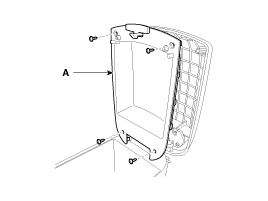
After loosening the mounting screws, then remove the armrest cover (A).
|
| 3. |
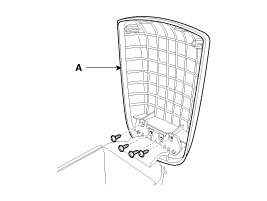
After loosening the mounting screws, then remove the armrest assembly (A).
|
| 4. |
Installation is the reverse of removal.
|
Components
[ M/T]
1. Floor console assembly2. Floor console tray3. Console upper cover [5 speed M/T]4. Console upper cover [6 speed M/T]5. Console storage box mat6. Console side cover [LH]7. C...
 Console: Components and Components Location
Components
1. Main crash pad assembly2. Crash pad side cover [LH]3. Crash pad side cover [RH]4. Cluster fascia panel5. Reinforcing panel6. Crash pad lower panel7. Center facia panel8. Crash pad g...
 Crash Pad: Components and Components Location
See also:
Fan speed control
The fan speed can be set to the desired speed by operating the fan speed control
switch.
To change the fan speed, press ()
the switch for higher speed, or push ()
the switch for lower speed. ...
Smart key functions
Carrying the smart key, you may lock and unlock the vehicle doors (and tailgate).
Also, you may start the engine. Refer to the following, for more details.
Locking
Pressing the button of the fro ...
AUX(Auxiliary) Jack: Repair procedures
Removal
1.
Remove the knob. Remove the floor console upper cover (A) using the appropriate tool.
(Refer to the BD group - "Console")
2.
Loosen screws (2EA) and remove the floor console tray ( ...
Categories
- Home
- Kia Sportage NQ5 (2022-2026) Owner's Manual
- Kia Sportage QL (2015-2019) Owner's Manual
- Kia Sportage QL (2015-2019) Service Manual
- Kia Sportage SL 2010-2016 Owner's Manual
- Kia Sportage SL 2010-2016 Service Manual

Copyright © sl.kispmanual.com 2014-2026 - 0.0546